How to read a nursing home star rating
Last updated
What the CMS overall star actually combines, what a blank cell means, and how to use Care Compare without treating the star as a verdict.
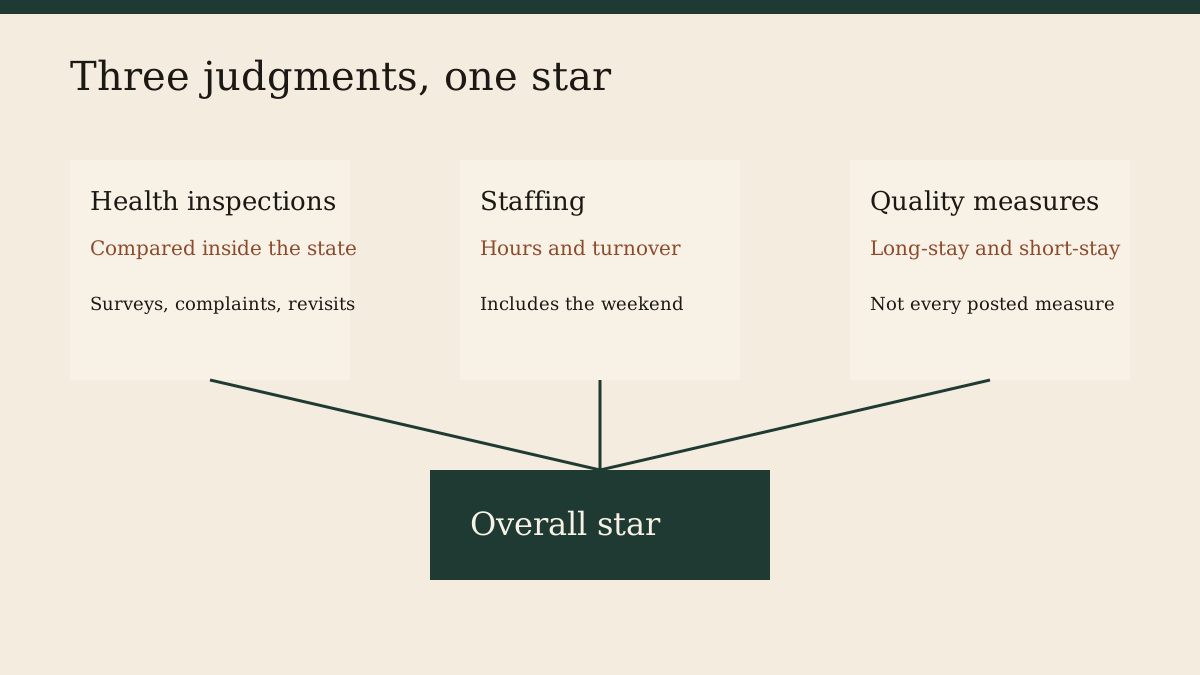
A star on a nursing home page is a CMS summary, not a review from a family and not a grade we assigned. The Centers for Medicare & Medicaid Services publishes it on Care Compare so people can tell homes apart without reading a hundred-page inspection. The summary is useful. It is also easy to overread. This guide is about what is inside the star, what the provider file on this site is copying, and what you still have to go look at.
The file we copy, and the page you should open
RetireByState tables come from the CMS Provider Information file, dataset 4pq5-n9py. The copy we use has a processing date of October 1, 2026, and CMS released it on October 28, 2026. We downloaded it on November 20, 2026. Each row is one Medicare-certified nursing home. The overall star, the health-inspection star, the staffing star, and the quality-measure star are columns in that row. If a column is blank, our table says “Not published.” That is not a zero. It means CMS did not put a number in the cell.
The name in our table links to that home’s Care Compare page. Use that page if you are choosing a place this month. Our table can be a few weeks behind the live site, and a phone number in a monthly file can already be wrong. Care Compare is the consumer record. The Technical Users’ Guide is the manual for how the stars are built. The September 2026 edition of that guide was the PDF on CMS.gov when we checked.
In the file we downloaded, 14,685 homes are in the states, the District of Columbia, and Puerto Rico. Of those, 3,154 have an overall rating of 5 and 2,753 have an overall rating of 1. Another 126 have no overall star in the file at all. Those counts are row counts. They are not a national report card we adjusted.
Three judgments, one overall star
CMS describes the overall rating as one to five stars built from three domains. Each domain has its own star. You can have a home that looks fine on one domain and poor on another, and the overall star will hide that unless you click through.
Health inspections come from state surveyors. The users’ guide says this domain uses the two most recent standard health surveys, plus complaint investigations and focused infection-control surveys from the most recent 36 months. Deficiencies are weighted by scope and severity. The number of revisits it took to confirm that problems were fixed also goes into the score. CMS then compares homes with other homes in the same state. A three-star inspection in Ohio is “about typical for Ohio,” not “the same as a three-star inspection in Arizona.” That is the single fact people miss most often when they compare states.
Staffing is not a state curve in the same way. The users’ guide says the staffing domain uses six measures: three about nurse staffing levels, in hours per resident per day, and three about turnover. The level measures come from the Payroll-Based Journal, the system homes use to report who worked, and from the daily resident census in the Minimum Data Set. They are case-mix adjusted, which is a way of asking whether the home is staffed for how sick its residents are, not just how many people live there. The level measures cover one quarter. Turnover uses six quarters. Weekend staffing is reported separately in the provider file because a building can post a respectable weekday average and still be thin on Saturday night. If you only remember one staffing question, make it the weekend.
Quality measures are scores from resident assessments and from Medicare claims. The users’ guide says the quality-measure rating uses 15 of the measures posted on Care Compare, nine for long-stay residents and six for short-stay residents. Not every measure you can see on the website goes into the star. CMS also publishes separate long-stay and short-stay quality ratings. A home that does a lot of short rehabilitation after a hospital stay and a home where people live for years are not doing the same job. The split exists so those two jobs are not mashed into one number without a trace. The overall quality star is still a mash. Read the split if the person you love is only going to be there for a few weeks, or only going to be there for the rest of their life. Those are different questions.
The overall star is CMS’s way of rolling the three domains into one figure. The users’ guide is explicit that no rating system covers everything that matters: whether the home does the specialty care you need, and whether your family can visit. CMS prints that caution on the Five-Star page. We are repeating it because the star is the part people screenshot.
What the other columns are
The provider file has more than stars. Certified beds are the beds Medicare and Medicaid have approved, not the number of people in the building today. The average number of residents per day is closer to how full the home is, and it has footnotes when CMS does not trust the figure. Ownership is a category such as for-profit or non-profit, plus a more specific type. A chain name, when CMS has one, tells you the home is not a one-off. Chain average stars are about the chain, not a promise that this building matches the chain’s average.
The Continuing Care Retirement Community field is a yes or no the home reports. In our copy of the file, 1,548 homes say yes. That means the nursing home told CMS it is part of a CCRC. It does not mean we checked the contract, and it does not mean the independent-living apartments on the same campus are in this table. Only the certified nursing home is.
Special Focus Facility is a CMS label for a home selected for extra oversight because of a history of serious quality problems. The same file marks 87 homes as SFF and 440 as SFF Candidate. Candidates are the pool CMS draws from when a slot opens. A blank is not an award. It means the home was not on that list in this monthly file. If you are touring a home with either label, read the inspections and call the long-term care ombudsman before you treat a clean lobby as the whole story. The ombudsman program is the one residents can use for complaints. The national resource center is at ltcombudsman.org.
The abuse icon is also CMS’s flag, stored as its own column. Our copy of the file has the icon on 1,401 rows. We print it because hiding it would be editorializing. We do not re-investigate the citation, and we do not describe the icon in more detail than the users’ guide does. Open Care Compare and the guide if you need the rule for when CMS turns the icon on. Do not take a sentence on a directory as the finding.
The survey date we show is the standard health survey date from rating cycle 1 in the file. It is not the date of the last complaint visit. Complaint surveys can be more recent and more important. They show up in the inspection domain even when our table only has room for one date.
How to read a single home without fooling yourself
Start with the person’s situation, not the star. Medicare’s nursing-home coverage page is about skilled care after a hospital stay, under rules about how long you were in the hospital and how many days Medicare will pay. A lot of long-stay residents are not on that Medicare benefit at all. They are paying privately or through Medicaid. The star does not tell you which payment the home will accept next month. Ask the home, and ask the state Medicaid office or the Area Agency on Aging if Medicaid is the plan. We do not keep a bed-availability list. Anyone who claims to, from a monthly CMS file, is guessing.
Then open Care Compare and read the three domains before you read the overall star a second time. If inspections are one star and staffing is five, you are looking at a home that reports a lot of nurse hours and has had serious survey problems. Those can both be true. If staffing is one star and inspections are five, you are looking at a home surveyors have not been writing up, that is running thin on nurses. Families feel that second pattern on the weekend. Write down the weekend hours from the file and ask the home what they mean for the unit you would be on.
Then read the newest inspection, not the star that summarizes two cycles. Ask what the home did about the worst deficiency. A deficiency can be fixed. A star moves slowly. The users’ guide explains that older surveys still count, on purpose, so a home cannot have one good survey and erase a bad year. That lag cuts both ways. A home that has genuinely changed can wear a bad star for a while. A home that had one calm year can still be carrying older harm.
If the overall star is missing, do not invent a story. Footnotes in the file explain some gaps: too new, too small, data CMS suppressed. Care Compare shows the footnote. Our table only shows that the star was not published. The footnote is the next click.
What we refuse to do with the star
We do not sort the state tables by stars. City and name order is dull on purpose. A five-star home at the top of a list looks like a recommendation, and we are not making one. We do not drop one-star homes. Families looking at those homes are often the people with the fewest choices, and hiding the row does not improve the building.
We do not average stars across a county and call it “quality of care in the county.” Inspection stars are already a comparison inside the state. Averaging them again across a city mixes short-stay rehab units with long-stay homes and calls the mixture a fact. The county counts on our state pages are counts of buildings. That is all they are.
We also do not translate a star into “safe” or “unsafe.” CMS’s own page says five stars means much above average and one star means much below average, and then it tells you the average is not the whole decision. If you need a locked memory-care unit, a home with five stars and no such unit is the wrong building. If you need a home your brother can reach by bus after work, a five-star home an hour away may be worse than a three-star home he can walk to. The file does not know your brother.
A short way to use this site
Pick the state. Read the overview so you see how many homes have no star and whether anyone is on the Special Focus list. Open the nursing-home table and find the building by name, not by star. Click through to Care Compare. Then use the visit checklist on this site as a set of questions, not as a score. If the building is a Special Focus Facility, or the abuse icon is on, call the ombudsman before you tour. Take the users’ guide seriously when a number surprises you. It is dry, and it is the document the number came from.
The star is a door, not a decision. Open it, and then read the inspection that sits behind it.